Your EAPH member name is the name that you specified during sign up. So, enter that name instead of your email address above. If you have forgotten your member name or password write for a reminder to
rob@robshelp.com
Every EAPH member is assigned their own unique login location during setup. That login location will be contained in a Welcome email sent when the setup process is completed. If you have any difficulty using the member login above, you may instead go to the login location in your Welcome email.
If you are a new member:
Important: When signing up via a PayPal subscription a Welcome email will be sent to the email address you use for your PayPal account. If you do not receive an email it could be that the email address being used by PayPal is out of date or is not the email address you usually use. If you are unable to receive email from the address that was stored at PayPal, please write to
rob@robshelp.com and explain the situation.
A ''Welcome to EAPH.com Hosting'' email will be sent sometime after you receive an email from PayPal announcing that your subscription has started. The new member setup process is not automated so time will elapse between signing up and receiving your Welcome email. An actual human being on this end configures the EAPH servers and tests every part of the service including logging in as you, creating a folder, and uploading a file before the Welcome email is sent. Please write to
rob@robshelp.com if you do not receive the Welcome email within a few hours. If more than 12 hours elapse without a response, please use the
Help Response System.
Confirm you are logging in at the correct location
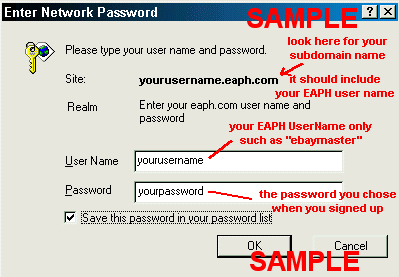
When you go to the login location assigned in your Welcome email a login screen will pop up looking something like this:
You can be sure you are at the right place by finding your EAPH member name somewhere preprinted in the popup window.
If you have any problems please let me know and I'll do everything in my power to help or correct! Rob
rob@robshelp.com